The Chromium engine, inside your app
Cefrium is a port of the Chromium Embedded Framework to native Android. Your app carries a full Chromium engine instead of borrowing the system WebView, so every device renders the same way and the engine changes when you publish, not when the device decides.
The difference, measured rather than claimed
A page that detects its own capabilities, rendered by both engines on the same tablet at the same moment. Nothing is asserted by the app; every verdict is computed by the engine showing it.
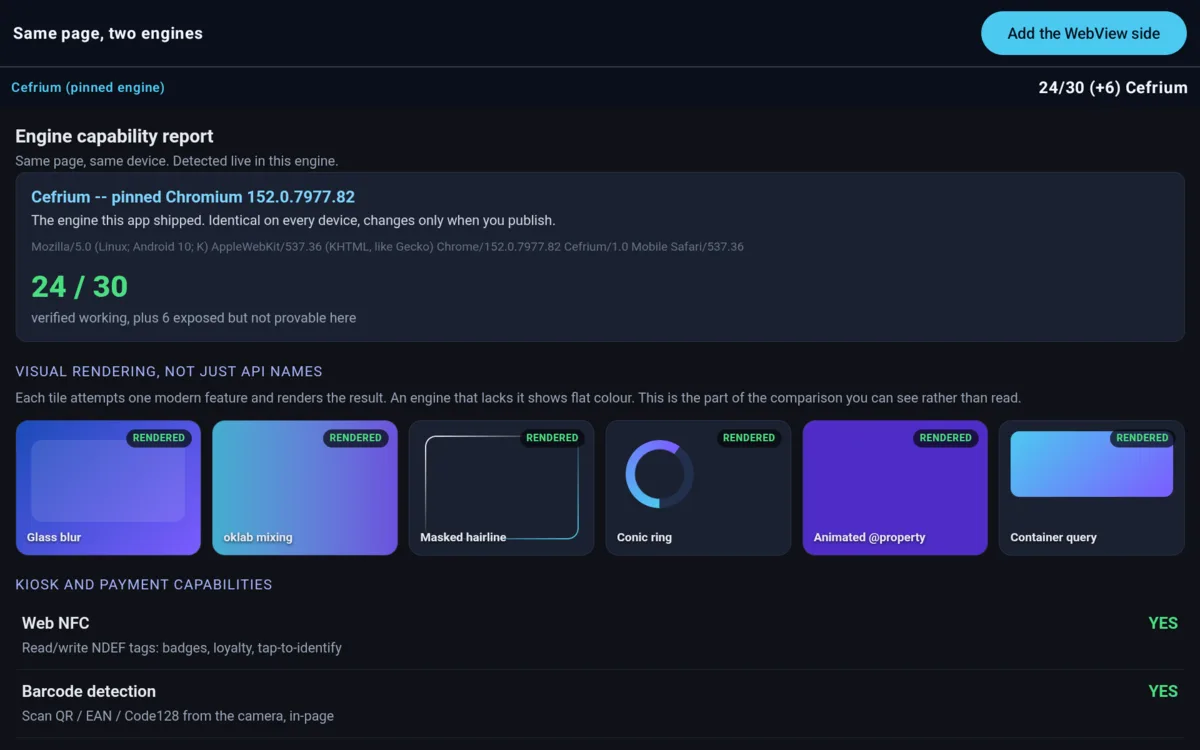
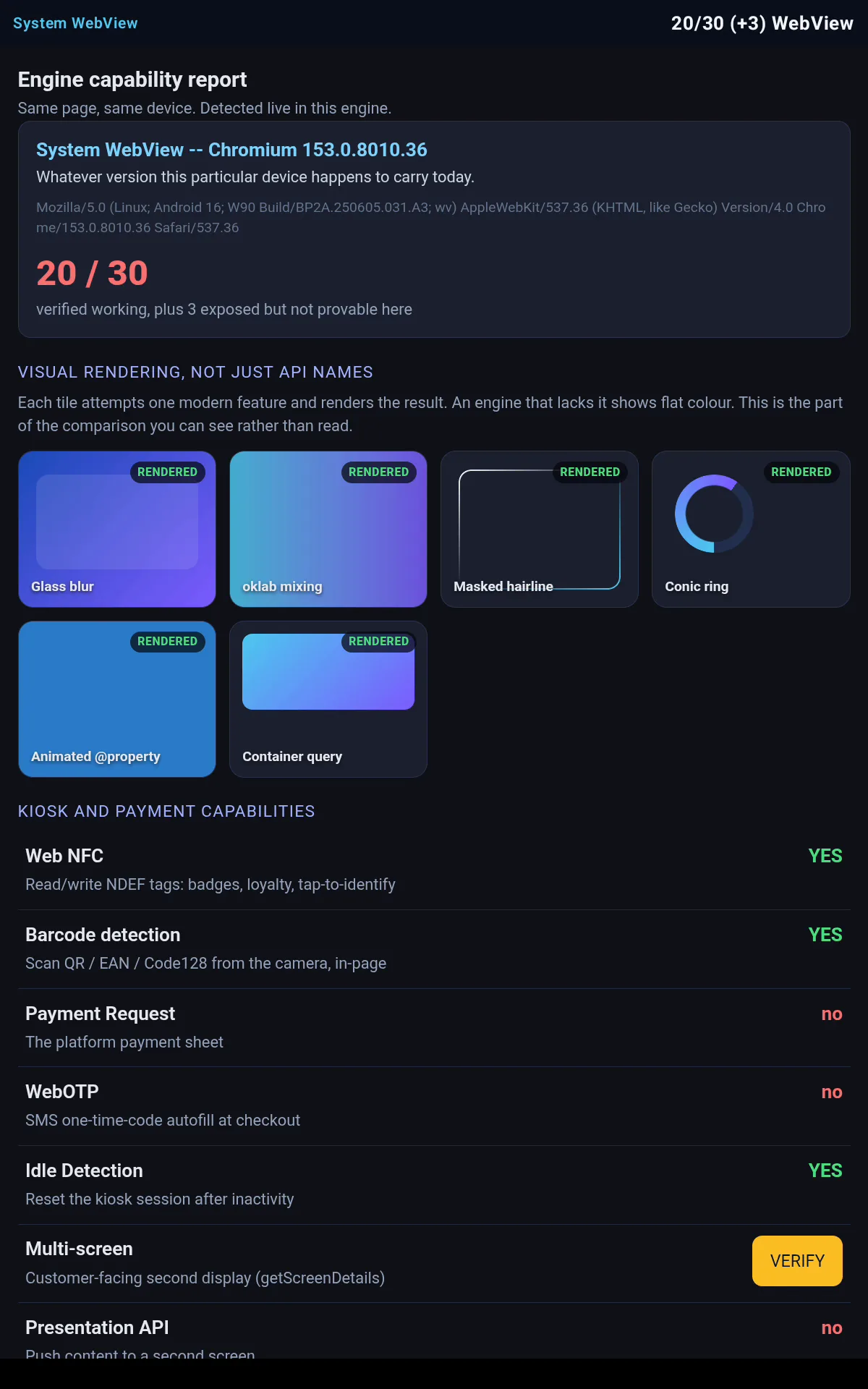
The argument for pinning is predictability, not freshness: one engine across a fleet, changing only when you ship, rather than whatever each device happens to carry on the day. A current phone may well have a recent WebView; the gap that shows up regardless is in capability, because the platform withholds the payment, credential and peripheral APIs from it -- and it widens on the old hardware kiosks actually run on, where the WebView stopped updating years ago and cannot be updated.
What you get that a WebView will not give you
A pinned engine
The same Chromium in your APK on every device. No silent swap underneath a shipped app, no fleet of engine versions to certify.
Off-screen rendering
Pixels delivered to your own buffer through OnPaint: compose the web into a game, a 3D scene or a PDF instead of into a view.
Every request, yours
CefRequestHandler sees them all, on every API level. Block, rewrite, serve from a custom protocol, or inspect.
Platform capabilities
Payment Request, passkeys via the Credential Manager, Web NFC, barcode detection, Bluetooth and USB -- the ones the WebView does not expose.
The modern web platform
Because it is the modern web engine: scroll-driven animations, view transitions, container queries, WebGPU.
An auditable binary
Two documented background calls, both switchable, and a written list of what the engine does not send. The audit.
Where it earns its weight: dedicated hardware
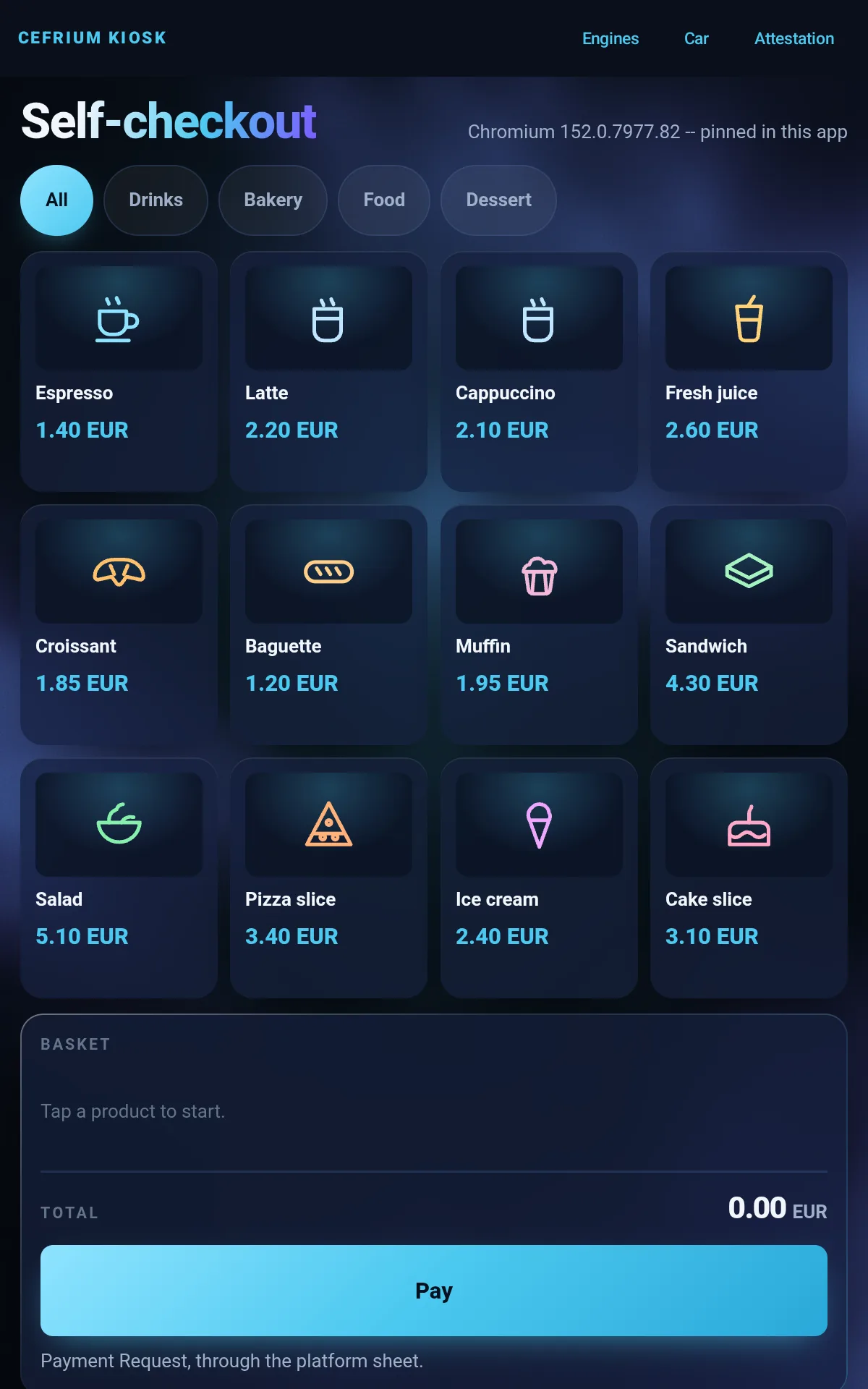
On a kiosk, a POS lane or a head unit the system WebView is a liability: it is replaced underneath your app, it differs on every model, you cannot state what it contacts, and on old units it stopped updating years ago and cannot be updated. Those are not annoyances, they are field incidents on hardware you may not be able to reach.
The samples are working apps, not screenshots: a checkout with a real Payment Request flow, an engine comparison you can run yourself, an old tablet reused as a car head unit, and a compliance screen that shows what the binary contacts.
Against the alternatives
| Capability | Cefrium | System WebView | GeckoView | Custom Tabs |
|---|---|---|---|---|
| Embeddable in your own UI | Yes | Yes | Yes | No, opens an external browser |
| Engine | Chromium, pinned in your APK | Chromium, whatever the OS has | Gecko, pinned | Chromium, whatever Chrome is |
| Off-screen rendering to a buffer | Yes, OnPaint | No | No | No |
| Multi-process control | Yes | No | Yes | n/a |
| Request interception | CefRequestHandler, every API level | shouldInterceptRequest, limited | Content blocking, limited | No |
| Payment Request, passkeys, Web NFC | Yes | No | Partial | Yes, outside your app |
| Web Bluetooth / WebUSB | Yes, with your chooser | No | No | No |
| Web Serial | Exposed, no Android backend | No | No | No |
| Footprint | Large: a full engine per app | Shared with the system | Large | None |
The last two rows are there on purpose. Web Serial is exposed but has no Android backend, so a serial printer is not addressable from the page; and a Cefrium app is big, because it carries an engine. If the system WebView meets your needs, use it -- this is for the cases where it cannot.
Get started
Add the dependency
dependencies {
    implementation 'com.cefrium:cefrium-sdk:0.9.2'
}
Published to Maven Central and a signed Codeberg mirror.
A libre variant without proprietary codecs is published alongside.
Show a page
CefriumWebView(
    url = "https://example.com",
    modifier = Modifier.fillMaxSize()
)
That is the whole integration. Full steps, including the JDK and Gradle versions, in the Quickstart.
See it running
An in-vehicle unit where the radio keeps playing while the navigation map is used: two engines' worth of work in one app, on real sites.
Built on other people's work
Cefrium is a port of the Chromium Embedded
Framework, which Marshall Greenblatt started in 2008 and which runs inside a great
deal of software you already use. The engine tracks upstream Chromium releases, so
it inherits their security fixes; every release ships a GPG-signed
SHA256SUMS, and the known limitations are written down next to the
features rather than left out. See About and
Releases.